
ONLINE VOTING PROCESS FOR GOVERNING BODY ELECTION
Guidelines for Society Members to vote for Election of Governing Body Members
_
Date: 29 May 2022, Sunday
Dear All Members,
Pursuant to notice issued for election of Governing Body Members, it has been decided to use online election portal called
Reasons to use this portal are
- Easy to use and online voting availability for all members in India and NRIs.
- Easy to set up voters list as well as ballot screen.
- Email notification and reminders to voters
- Tracing and auditing of all voting activity log of voters, including time stamp, IP Address and Device Fingerprint, to ensure integrity of election.
- Cost of using portal
An opportunity for demo of portal and voting process was given to all Candidates and out of eleven, 8 candidates joined for demo and were shown the full process from setting up to voting to result and various audit reports and all candidates confirmed their satisfaction.
When will voting start and end?
Voting will start on 1st June 2022 – 09AM IST and will end on 7th June 2022, 06PM IST
How will I vote?
Each member will receive on her/his society registered email, an invitation to vote with Voter ID and Voter Key, and a click to Vote Button in email, from “Chief Election Officer – JPSCWS”. Please check your spam folders, in case email is not in your Inbox.

Members can either go to portal and use Voter ID and Voter Key to log in and vote or click the “Vote” button in email directly and you will not be required to log in and instead be show Ballot Screen to choose your candidates and vote.
How does Ballot Screen look like?
Ballot Screen will have list of candidates and “Click Button” to select your preferred candidates.
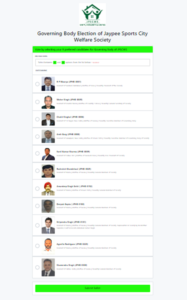
You are required to select minimum 7 and maximum 9 candidates and then click on Submit Ballot button.
System will not allow to submit ballot is candidates chosen are less than 7 or more than 9.
Why is there minimum 7 and maximum 9 selection to be made?
7 is minimum requirement under Societies Registration Act and 9 is positions available in our society’s byelaws.
How will I know that my vote is registered?
After submitting ballot button, you will be asked for reconfirmation and after this a “Ballot Receipt” will be shown on screen, which one can save by right click and save or by taking screenshot of it. An issuance of ballot receipt is assurance of vote registered.
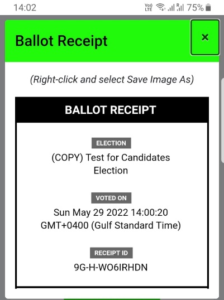
What If I want to change my selection of vote after submitting ballot?
Once a person has voted, he can not change his vote. Portal will also not allow to log him in once the ballot is submitted. Every person can vote only one time.
What is I do not receive any email for voting?
Please send message to Chief Election Officer on email ID, jpscws.election.officer@gmail.com or send WhatsApp Message on their mobile number and they shall assist to provide Voter ID and Voter Key to cast the vote after verification.
What information does portal collect when I am voting?
Part of integrity check of election, portal will collect IP Address and Device Fingerprint to do fraud analysis, if same device is not used to cast multiple votes and this is highlighted in Fraud Analysis Report if found any.
Voter Activity Log

Voter Log

Will the results be shown live on Portal?
No, as agreed and confirmed by candidates, results shall be declared after voting has been closed, audited, and confirmed results are available.
When will we know the results?
Results shall be announced anytime after election is closed and all reports are reviewed by election officers but before or on 9th June 2022.
What if I do not have access to Internet or digital device?
Members can report to Election Officers, and they shall take a call on what assistance can be provided for members to cast their vote.
For any other clarifications, please contact Election Officers on email ID jpscws.election.officers@jpscws.com